
Audit your trading with your exchange data.
Connect your account read-only. Audalyst reads every trade with its fees and funding, finds what repeats when you lose and tells you what it costs you. Nothing to log by hand, no coding.
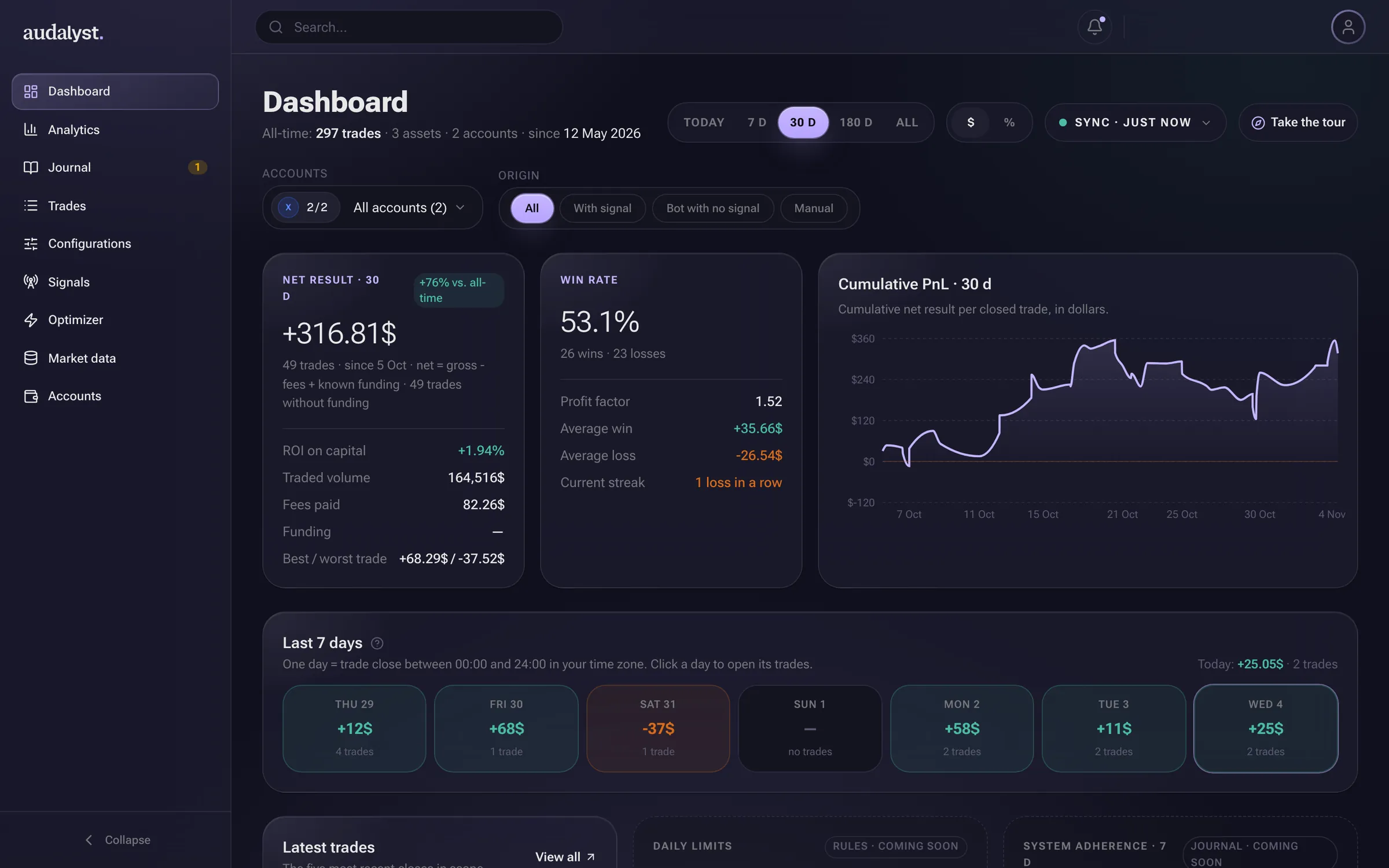
Home: the period's result with fees and funding included, and what the bot did kept apart from what you did.
- Read-only connection
- BingX, Bitget and Bitunix
- Fees and funding in every trade
- Bot and manual, kept apart
- In English and Spanish
The problem
Your history knows things about you that you don't yet.
Hundreds of trades leave a trail. The answers that matter are in there; the hard part is getting them out without spending your nights in a spreadsheet.
Am I winning because of my system, or in spite of it?
Every trade knows whether a signal opened it, the bot without a signal, or you by hand. Split them with one click on every page.
At what time and on which asset do I really lose?
Ten breakdowns (hour, day, session, duration, asset, side, leverage, account, macro event and signal), and every number takes you to its trades.
How much do funding and fees eat into my results?
They go into every trade's net result, with what your exchange actually charged.
What is my real R?
Stop and target are read from the exchange. If they're missing, R is estimated from the risk you declare and marked as approximate.
Do I jump back in on tilt after a loss?
Behavior flags fire on their own: re-entering right after a loss, sizing up, trading more than usual.
What does that habit cost me?
Every flag comes with its cost in money. You answer whether you own it or had a reason.
The product
From your exchange to a conclusion, in four steps.
- 01 · CONNECT
Your account, read-only. Nothing to type in.
You create a read-only API key on your exchange, paste it and sync. Your closed trades come in with their fees and funding, and with stop and target when the exchange has them.
No files to upload and no spreadsheets. Keys are stored encrypted.
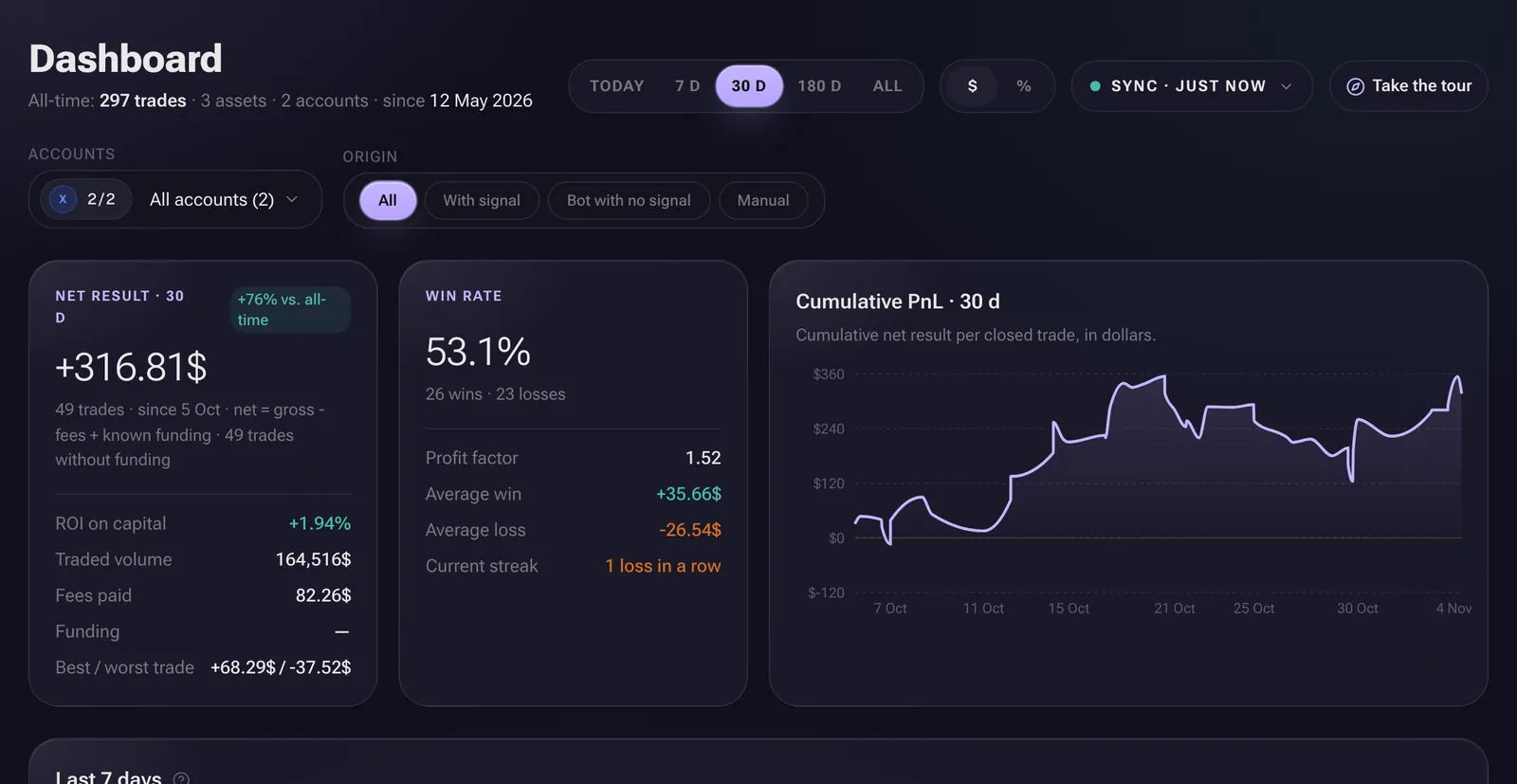
- 1All your history, imported
- 2Synced with your exchange
- 3Fees and funding, included
- 02 · MEASURE
Every number leads to the trades behind it.
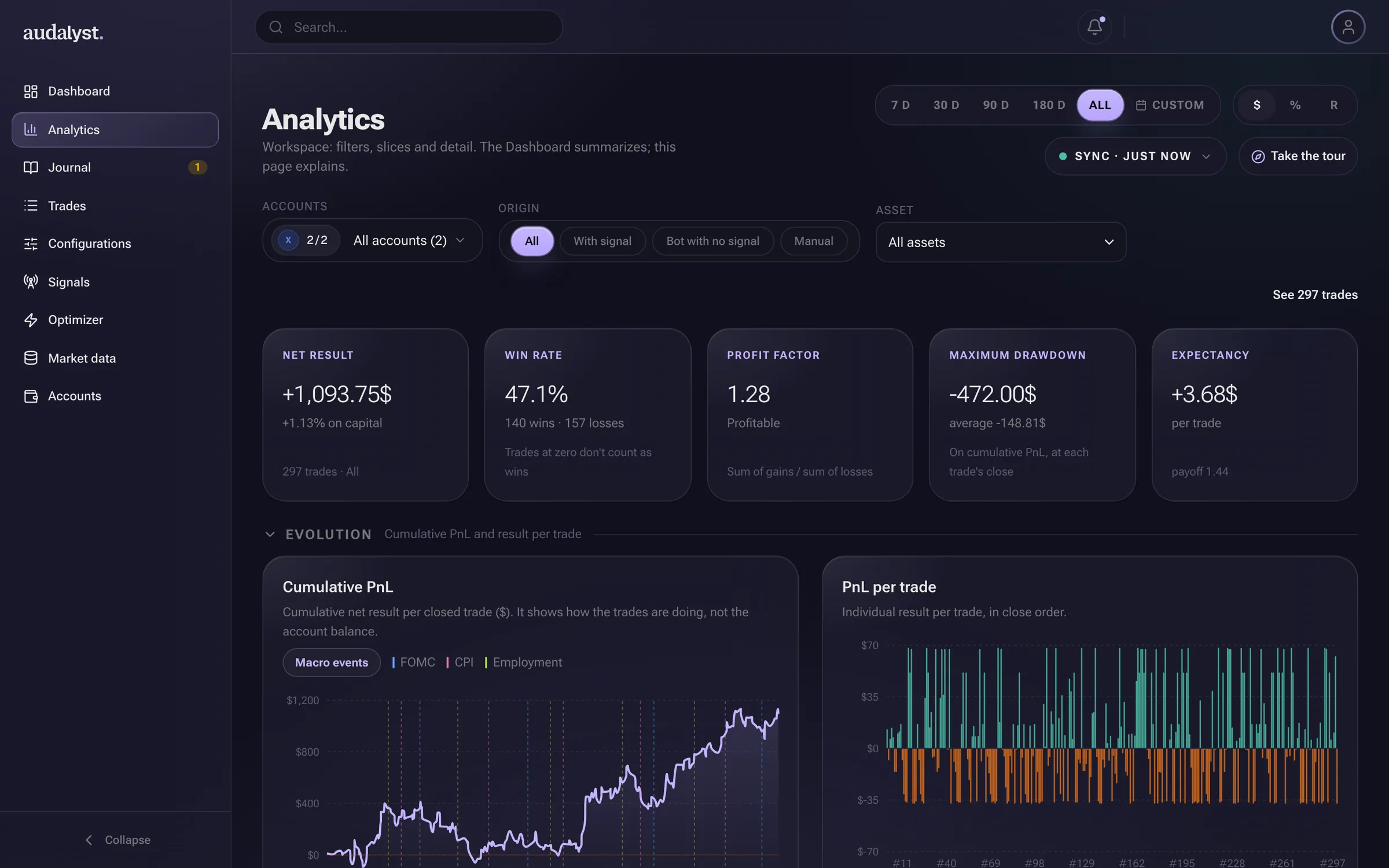
Result, win rate, profit factor, max drawdown, Sharpe or Sortino, in dollars, % or R. Pick a dimension and a metric, and the bar that stands out shows where you win and where you lose.
Click a bar and the page narrows to those trades. Click "See trades" and you land on the exact list, with the same number of trades and the same net. If the sample is small, it tells you.
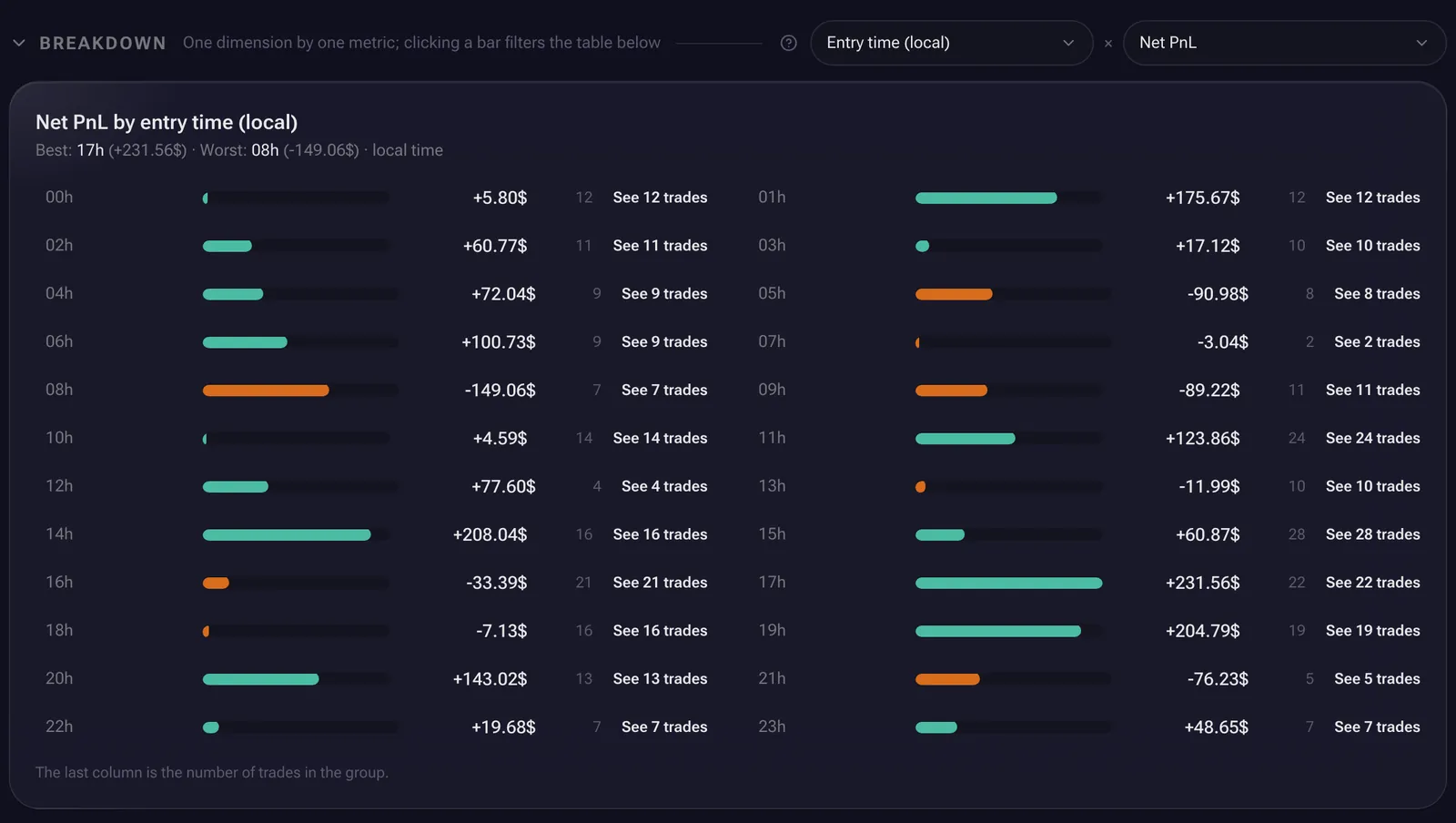
- 1Pick the breakdown and the metric
- 2The hour that costs you most
- 3Every row leads to its trades
- 03 · DETECT
Your habits, flagged without you looking for them.
Audalyst reviews every day and flags what falls outside your way of trading: jumping back in right after a loss, sizing up after a loss, closing a winner early, trading more than usual.
If you trade with a bot, also changing its configuration after a loss or pausing it mid-streak. No manual tagging: the flag shows up on its own and you answer it.
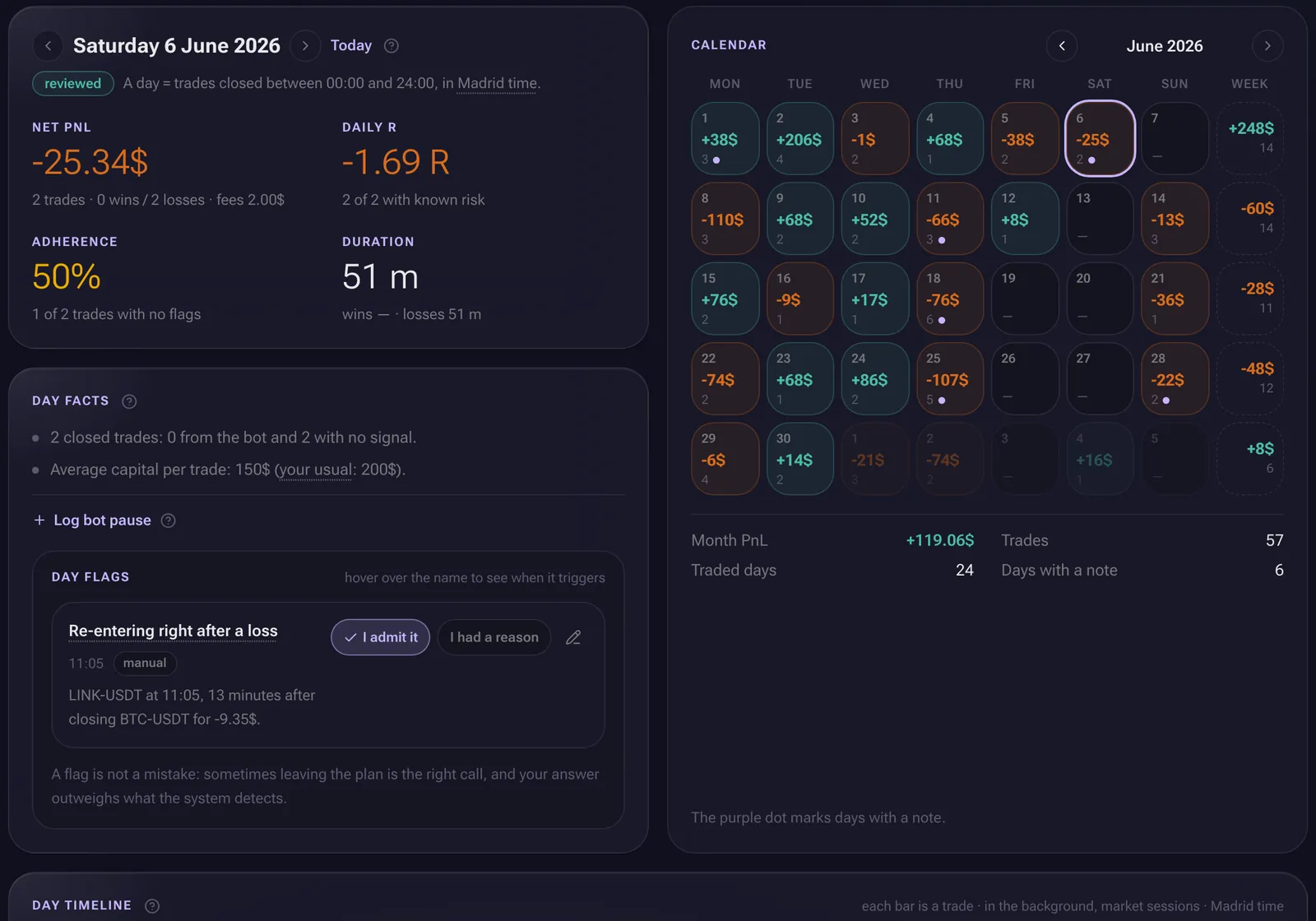
- 1Daily adherence
- 2Fires on its own, no tagging
- 04 · REVIEW
A journal that fills itself in. You bring the judgment.
Every day comes with its result, its trades and a line on what happened: market sessions, configuration changes, bot pauses and macro data. You add the note, with a three-line template, and close the day.
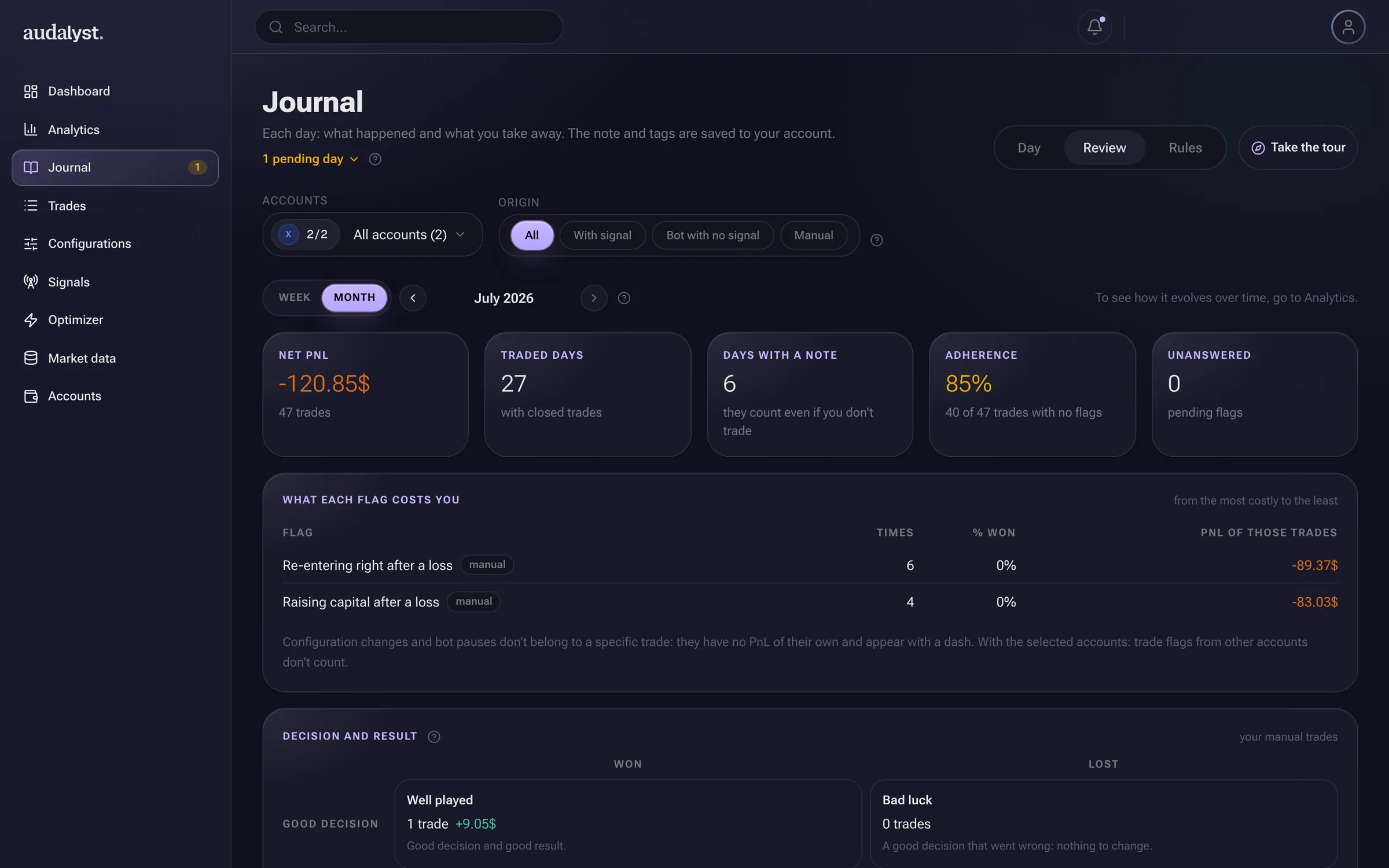
Every week or month, the review gives you your adherence, what each flag has cost you and how many of your decisions were good even when they went wrong.
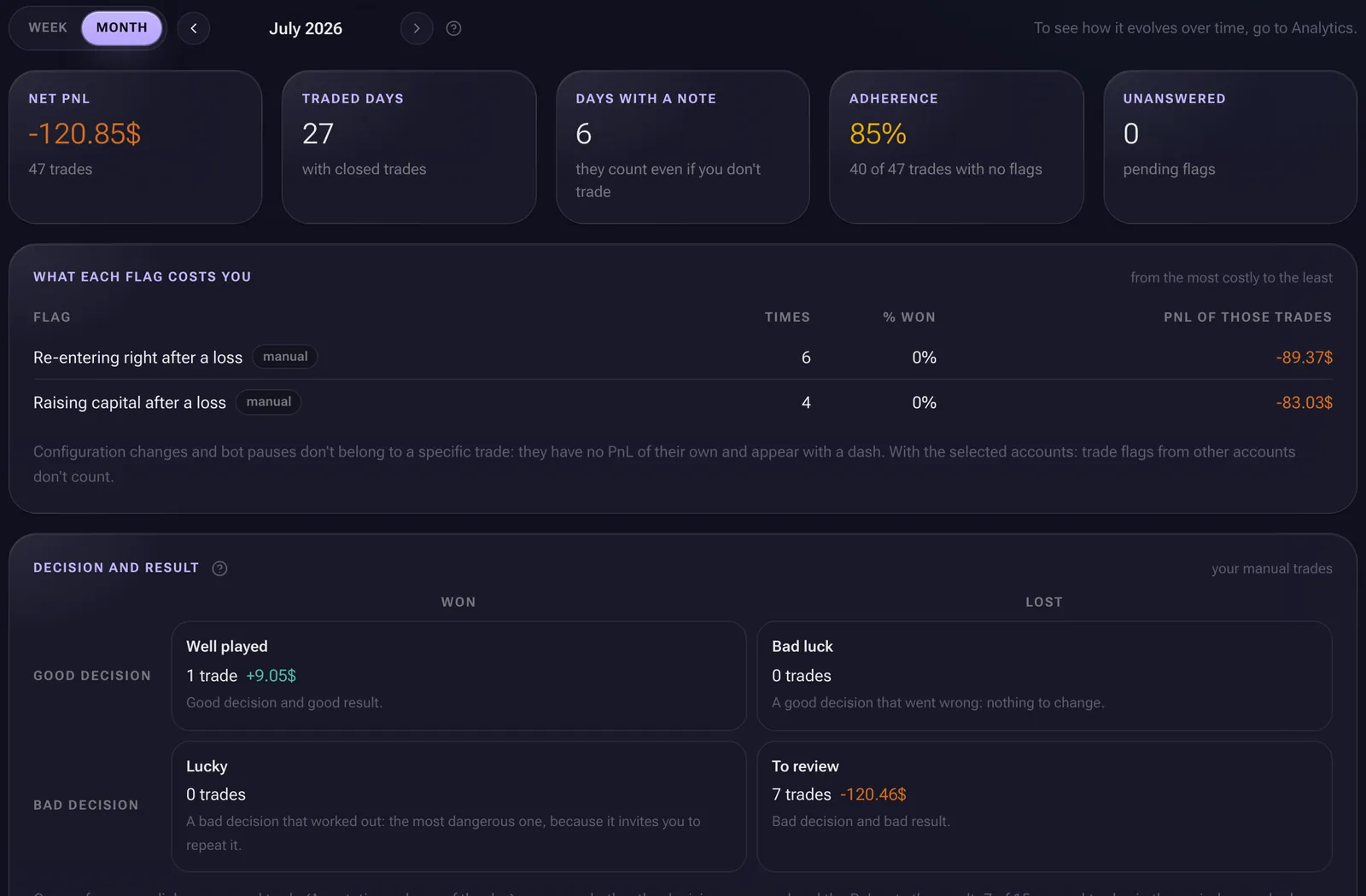
- 1Adherence, no checkboxes
- 2What each flag costs you
- 3Skill or luck
- 1All your history, imported
- 2Synced with your exchange
- 3Fees and funding, included
In detail
Every trade, with its full story.
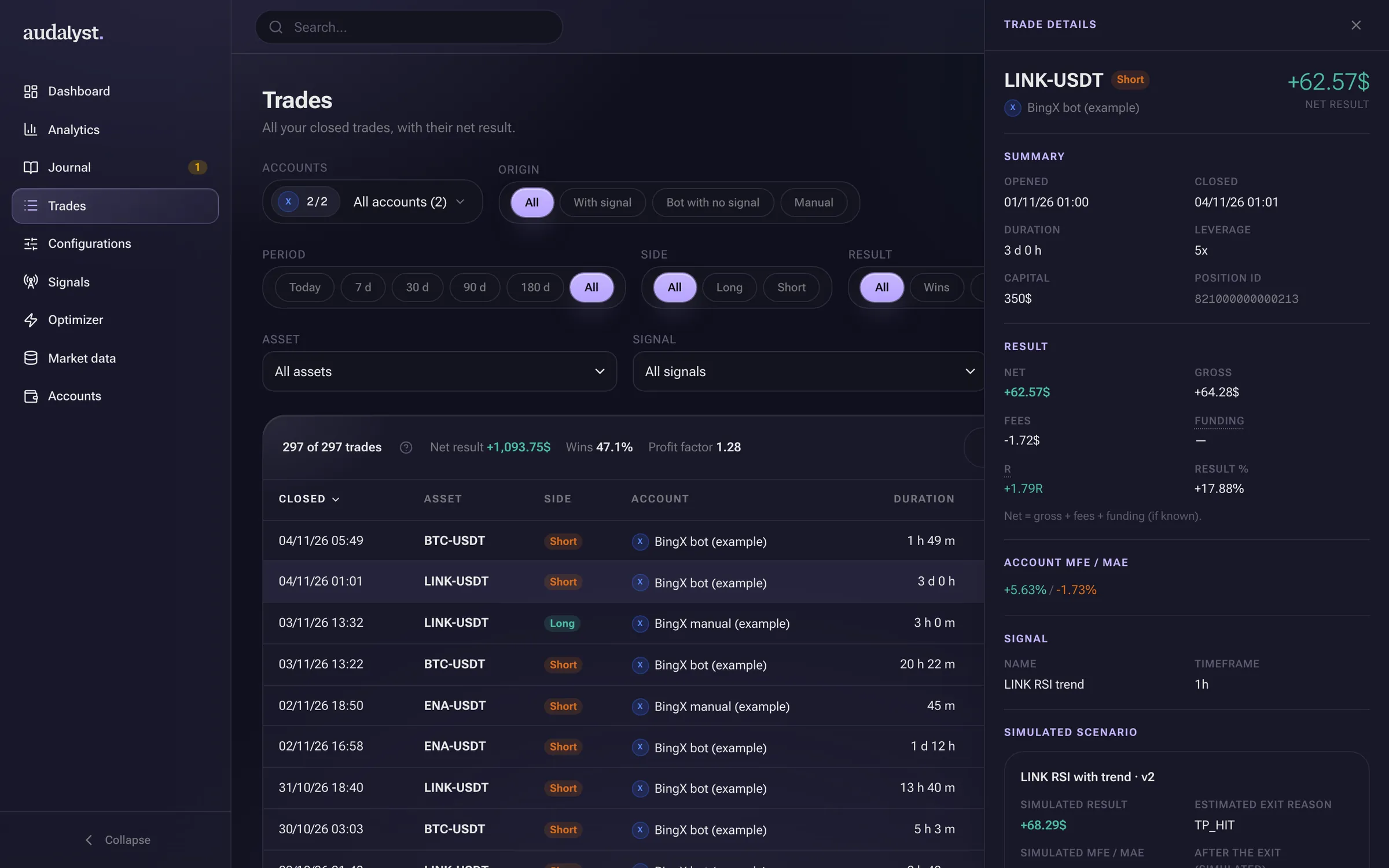
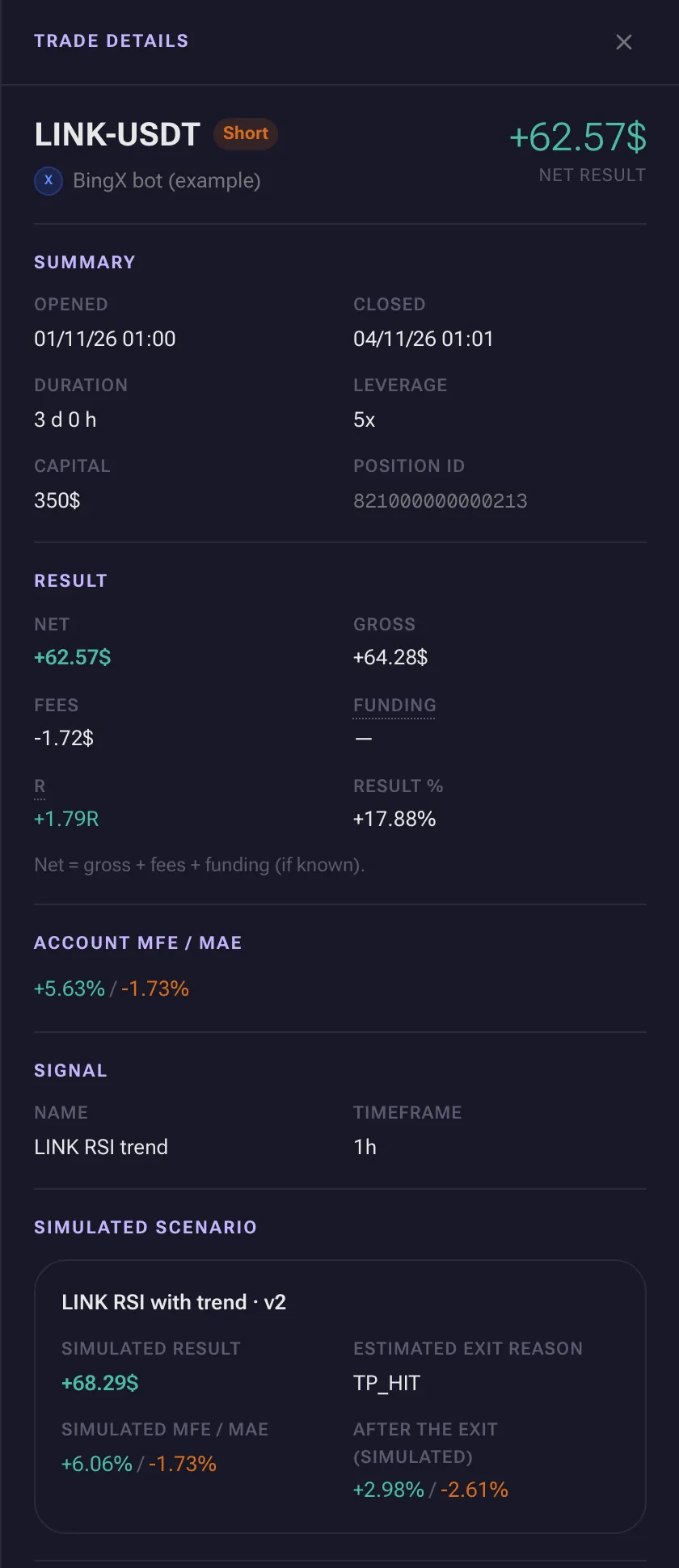
Open a trade and it's all in one view, without going back to the exchange.
- The real net
- Net = gross + fees + funding. What you keep, not what the price showed.
- R read, not typed
- From the exchange's stop; if there isn't one, approximate and marked as such.
- What it could have given
- How far it went for and against you, when there are 1-minute candles for the asset.
- Signal and scenario
- Which alert opened it and what your bot's configuration would have done.
Was it the bot, or was it you?
If you trade with a bot or TradingView alerts, every trade knows which signal opened it. A selector on Home, Analytics, Trades and Journal separates what came from a signal, what the bot opened without one and what you did by hand. No tagging needed.
- 1Net with everything in
- 2The signal that opened it
- 3What the config would have done
Lab
BetaTest a change before you put money on it.
For bot and alert traders: simulate your configuration on your real signals and 1-minute candles, and search for better parameters without fooling yourself with the past.
Simulator on real signals
Your configuration (stop, target, size) against the signals that actually arrived, 1-minute candle by 1-minute candle.
Optimization validated in windows
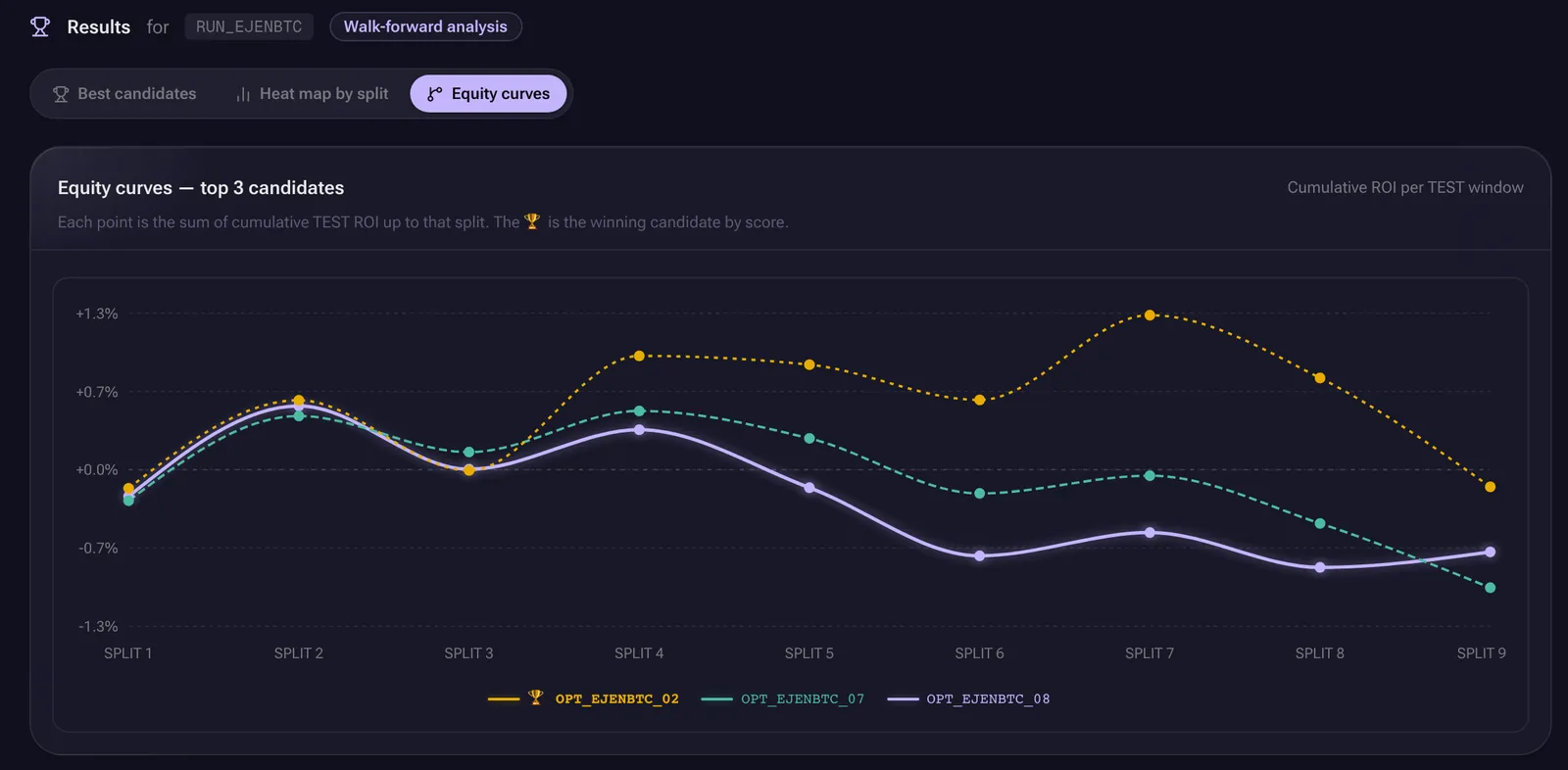
It searches for parameters in one window of your history and checks them on the next, which the search hasn't seen. If an idea only works where you found it, it was noise.
Versioned configurations
Every change creates a version with its history, and the Journal marks the day you changed what.
Walk-forward validation: each row searches in one window and checks on the next.
- 1Validated in windows
- 2Results on windows the search never saw
The lab works and you can use it, but we're still refining it with the first users. That's why it carries the beta label, here and inside the app. Its results describe the past; they don't promise the future.
The difference
A journal asks you to log. Audalyst reads.
The usual wayYou type in every trade's stop to know your R.
With AudalystStop and target are read from the exchange on every sync.
The usual wayYou tag by hand what the bot opened and what you opened.
With AudalystEvery trade knows if it came from a signal, from the bot without one, or from you.
The usual wayYou tick boxes to measure whether you follow your plan.
With AudalystAdherence comes out on its own: the share of trades without flags.
The usual wayYou know you have bad habits.
With AudalystYou know which ones, how often, and what they cost you.
The usual wayTesting a rule on your history takes coding.
With AudalystYou simulate and optimize from the interface, without writing code.
Why it exists
Serious analytics, within reach of any trader.
Knowing why you win and why you lose shouldn't require knowing how to code or having a data team behind you. Audalyst is built by traders, for traders: to trade with less emotion and more evidence.
- 01
Evidence before intuition
The feeling of the moment lies. Your trades don't: Audalyst shows you what happened, with the data to back it.
- 02
Powerful, no coding
Breakdowns, ratios, simulations and walk-forward validation from the interface. A guided tour on every page and an explanation for every metric.
- 03
Honest about what it doesn't know
If a data point is missing, it shows a dash and tells you why, instead of a zero. If the sample is small, it warns you. What's in beta says so.
Who it's for
It's for you if
- You trade crypto perpetual futures on BingX, Bitget or Bitunix, by hand, with a bot, or both.
- You want to understand your trading with data before changing it.
- You suspect a habit is costing you money and want to put a number on it.
It's not for you if
- You're looking for signals, copy trading or a bot that trades for you.
- You expect a promise of profits.
- You trade stocks, forex or options: today Audalyst only works with crypto perpetual futures.
Frequently asked questions
Beta access
If it doesn't help you trade better, at least you'll know exactly why you lose when you lose.
- 01
Request access
With your email, below.
- 02
We invite you
The beta is invite-only: we'll write to you when we can give you access.
- 03
Sign in and look around
Go through the example trader and connect your account whenever you want.
Free during the beta, no card required. Pricing will be announced before launch.